IN THIS ARTICLE · 9 PARTS
- 01Why one general "Services" page is not enough
- 02The five parts of a service page
- 03Write it to be scanned in seconds
- 04The price: give at least a guide
- 05Example: Kochev Stroy 77's bathroom renovation page
- 06Proof and the button: the last few metres
- 07Checklist for your service page
- 08If you would like someone to lay it out with you
- 09References
A services page that sells talks about one service, not everything you do. It has five parts: the customer's problem, how you solve it, proof that you can, a guide to the price and one clear next step. If you have five main services, make five pages, each named the way people actually search for it on Google. Here is how to build one, with a template you can copy and an example from a real website.
Why one general "Services" page is not enough
Most small businesses have a single "Services" page with a list: "Renovations. Tiling. Painting. Electrical." The trouble is that someone searching for "bathroom renovation" does not want to read about wiring. They want to see that you do exactly this, how it works, roughly what it costs and how to get you round.
A separate page helps with something else too. Google advises thinking about the words someone might search for to find your content, and writing with them in mind [1]. A page titled "Bathroom renovation in Sofia" has a far clearer topic than one that lists ten jobs at once. How to write that title and description for Google is covered in page titles and meta descriptions that get clicks.
How many pages you need depends on the business. If you offer two or three similar services, one well-organised page may be enough. There is more on that choice in one-page or multi-page website.
The five parts of a service page
Order the page the way the customer asks their questions. Here is a template you can copy:
| Part | What goes there | Example for a nail salon |
|---|---|---|
| 1. Heading and problem | The service name, the town and the problem in the customer's words | "Gel polish in Plovdiv that lasts three weeks" plus one sentence on the need |
| 2. Solution | What exactly you do, step by step, and how long it takes | Preparation, application, how long the appointment takes |
| 3. Proof | Photos of real work, reviews, experience | A gallery of your own photos and two named reviews |
| 4. Price guide | A "from" price, packages, or what the price depends on | "From …" and what the price includes |
| 5. Action | One main button and a phone number | "Book a time" and a number that dials with one tap |
Below those five parts, add a few short questions and answers and links to related services. The example in the table is only an illustration: use your own prices and timings.
Write it to be scanned in seconds
People rarely read a page word by word. Nielsen Norman Group's eyetracking research shows that users scan pages, often in a pattern shaped like the letter F [2]. The same researchers recommend [2]:
- putting the most important points in the first two paragraphs;
- using headings and subheadings that stand out from the body text;
- starting headings with the words that carry the meaning;
- using bullets or numbers for lists and steps;
- bolding important words.
Headings help more than the eye. According to the W3C, they communicate how the content is organised, and browsers and assistive technologies use them to move around the page [3]. So "What it costs", "How it works" and "Questions" as subheadings do double duty. There is more on the copy itself in how to write your website copy.
A good service page answers questions in the order the customer asks them: do you do this, how, are you any good, what does it cost, how do I get you.
The price: give at least a guide
Many businesses hide prices because "every job is different". But that is exactly what people are looking for. In its research on business-to-business websites, Nielsen Norman Group reports that price is visitors' number one information need, and that participants go to competitors' sites when a site does not show prices [4]. When an exact price is unrealistic, NN/g recommends showing prices for typical scenarios or a price range [4].
For a small business, that means:
- A "from" price for the most common version of the service.
- What is and is not included: labour, materials, travel, guarantee.
- What the final price depends on: size, condition, complexity.
- How to get an exact price: a site visit, photos sent by phone, a free consultation.
A guide does not commit you. It filters out people looking for something else entirely and shows you have nothing to hide.
Example: Kochev Stroy 77's bathroom renovation page
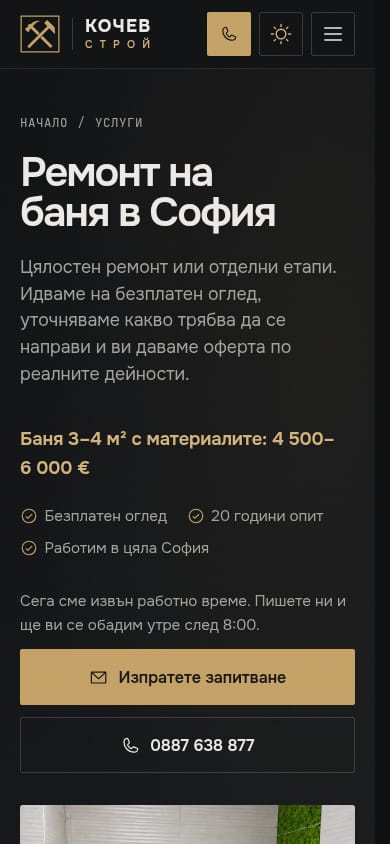
At sofia-remont.com, the company has separate pages for bathroom renovation, tiling, painting and electrical work instead of one general page. The bathroom page follows the template above closely:
- the service area, Sofia, and the free site visit are clear from the start;
- the stages are described from demolition to fitting sanitaryware, with photos of real work;
- prices sit in a separate price list by task, with a note that they cover labour without materials unless stated otherwise;
- the enquiry button leads to the site-visit form with the service already selected, and on phones the phone number sits right beside it.
The full case is in website for a construction and renovation company.
Proof and the button: the last few metres
Right before the button is where people hesitate most. Put two or three photos of real work and one or two reviews from real customers there. Why your own photos beat stock images is covered in which photos to put on your website, and how to collect more reviews in how to get more Google reviews.
The button should say what happens when it is pressed: "Book a site visit", "Book a time", "Get a bathroom quote". More examples are in call-to-action buttons that bring customers.
And do not forget your Google profile. For some business categories, Google lets you add your services to your Business Profile, with a description and price [5]. Use the same service names as on your website. For a step-by-step setup, see Google Business Profile setup.
Checklist for your service page
Open the page on your phone and check:
- Does the heading include the service name and the town?
- Do the first two paragraphs say who it is for and what problem it solves?
- Is the way the work goes described in steps?
- Are there at least two real photos and one review?
- Is there a "from" price, a range, or at least what the price depends on?
- Is there one clear button and a phone number that dials with one tap?
- Are there links to related services and to your homepage?
Every "no" is a concrete task for the next version of the page.
If you would like someone to lay it out with you
Service pages are where good structure shows up fastest in your enquiries. At Studio V1 a website costs €50 a month including VAT and covers design, a build reviewed by real developers, hosting, maintenance and minor updates, with the first version live within 7 business days. See our projects or tell us which services you offer.
References
- Google Search Central. "SEO Starter Guide: The Basics." developers.google.com/search
- Nielsen Norman Group. "F-Shaped Pattern of Reading on the Web: Misunderstood, But Still Relevant (Even on Mobile)." nngroup.com/articles/f-shaped-pattern-reading-web-content
- W3C Web Accessibility Initiative. "Headings." w3.org/WAI/tutorials/page-structure/headings
- Nielsen Norman Group. "State the Price to Give B2B Sites a Competitive Advantage." nngroup.com/articles/show-price
- Google Business Profile Help. "Manage your services on your Business Profile." support.google.com/business

