IN THIS ARTICLE · 7 PARTS
Google Ads make sense for a small business when three things are true: people already search for your service on Google, you work in a clear area, and your website turns a visit into a call or an enquiry. Then even a small budget can work, because you only pay for people who are looking for exactly what you offer right now. If one of the three is missing, fix that first. Otherwise you pay for clicks that never become customers.
A 2-minute check: are you ready for Google Ads?
Answer each line honestly. If you have two or more "no" answers, start there.
| Question | If "yes" | If "no" |
|---|---|---|
| Do people search for your service with phrases like "bathroom renovation Sofia"? | Google Ads are a good fit | Check the phrases with keyword research or consider Facebook ads |
| Do you know what one customer brings you? | You can work out a budget | Work it out before you pay for the first click |
| Does your website have a page for the service the ad can lead to? | The ad has somewhere to land | Build it first: here is what a services page that sells looks like |
| Is your phone number visible straight away on mobile? | A click can become a call | Put a call button at the top |
| Do you track calls and sent forms? | You will know what a customer costs | Set up measurement |
| Can you answer an enquiry during working hours? | Someone is there to meet the ad | Run it only in the hours when you pick up |
If most answers are "yes", Google Ads are a sensible next step. What they cost in money (budget and fee) is covered separately in how much Google Ads cost.
A small budget: narrow it down, don't spread it thin
With a small budget, the biggest mistake is letting the ad show to everyone, everywhere, at any time. Google Ads give you a few settings to steer the money only to where it makes sense.
The area
You can show your ads to people in specific places relevant to your business [1]. Google separates people who are physically located in the area (or regularly there) from people who have shown interest in it, for example searching for services in Sofia while they are in Plovdiv. You can choose one, the other or both [1].
For a local business this choice matters. A hair salon in Lozenets almost certainly wants only people nearby. A guest house in the mountains wants exactly the people in other cities who are planning a trip. Think about which case is yours before you launch the campaign.
The hours
By default, ads can show at any time of day [2]. With an ad schedule you can choose days and hours, for example only during business hours when you can handle enquiries [2]. If you run the workshop alone and don't answer the phone after 7 pm, there is no point paying for clicks at 11 pm.
One note from Google: even with a schedule, the campaign paces toward a monthly spend of up to 30.4 times the average daily budget, however many days it is active [2]. The schedule steers money towards the better hours. On its own it does not reduce it, so the monthly ceiling is still set by the daily budget.
The keywords
A few phrases with a clear intent ("car service Plovdiv", "roof repair Varna") work better than broad ones ("repair", "car"). Add negative keywords for things you don't offer. How to pick them is in the article on keyword research.
A small budget is not a problem if it is focused. It is a problem if it is spread over people who will never become your customers.
Your phone number right in the ad
Most small businesses earn from a phone call, not from a purchase on the website. Google Ads let you add your number to the ad with call assets [3]. On a device that can make calls, a call button shows under the ad, and on a computer a "Call us" button [3]. So a person can call you directly or go to your website.
Google warns explicitly: don't put the phone number in the ad text itself, as that may get the ad disapproved. Use the asset instead [3].
Pair it with the schedule: a call button only makes sense when someone is there to pick up.
The page the ad leads to decides a lot
The ad only brings the person. The decision to call you is made on the website. Google puts it its own way: in Quality Score, one of the three components is landing page experience, meaning how relevant and useful the page is to people who click your ad [4]. The other two are expected clickthrough rate and how closely the ad matches the search [4]. The score is a diagnostic tool, not a direct input in the auction [4], but it shows where to improve.
Here is what to check on the page before you run an ad:
- It leads to the service page, not the homepage. Someone who searched for "tyre change" should see tyre changes.
- The phone number is on the first mobile screen, with a one-tap call button. More in buttons that bring customers.
- The area is spelled out: which towns or neighbourhoods you cover.
- A price, or at least "from…", if you can. People click to find out whether they can afford it.
- The website opens fast on a phone. If it doesn't, see why a website is slow.
- There is proof: photos of real work, reviews, years of experience.
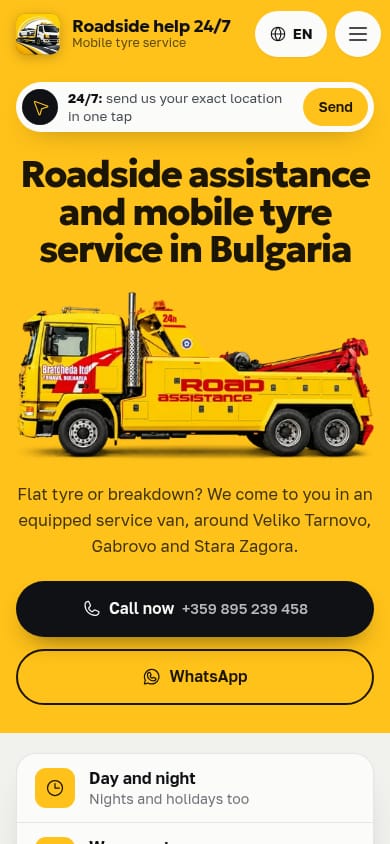
An example from one of our projects: for the roadside assistance site mobileservicebg.com, the first mobile screen holds a large "Call us" button, WhatsApp, the service area and a button to send your location. That is exactly the kind of first screen you want when you pay for every click. The full story is in the article on a car service and roadside assistance website.
A free check: what others advertise
Before you write your first ad, look at what competitors do. Google has the Ads Transparency Center, a public place where you can look up an advertiser and see the ads they have run, in which region and when they last ran [5]. Don't copy other people's text, but see what others promise and how you can stand out: a clearer price, a quicker reply, a tighter area.
The first 30 days: what to watch
Don't judge the ad after three days. Give it a month and look every week:
- What did the week cost, and how many calls and enquiries came in?
- Which real searches did people click on? Stop the useless ones with negative keywords.
- At what hours do enquiries arrive? Move the schedule there.
- Are there clicks from outside your area? Check the location setting.
And don't forget the free things that work alongside the ad: a complete Google Business Profile and a website that slowly grows in the organic results.
If you don't have time to run campaigns yourself, at Studio V1 we manage Google and Facebook ads for a fixed monthly fee including VAT: €100 for Google Ads, €150 for Meta Ads and €230 for both together. You pay the budget straight to Google with no commission to us, we review every week and send you a report, and there is no minimum term. We don't promise a number of enquiries or a position in the results, but you will see the numbers.
References
- Google Ads Help. "About targeting geographic locations." support.google.com/google-ads
- Google Ads Help. "About Ad Scheduling." support.google.com/google-ads
- Google Ads Help. "About call assets." support.google.com/google-ads
- Google Ads Help. "About Quality Score for Search campaigns." support.google.com/google-ads
- The Keyword (Google blog). "Announcing the launch of the new Ads Transparency Center." blog.google

